
Feed Sponge2.0.2 - Google Play
You'll be able to see results in few seconds.
Publisher Description
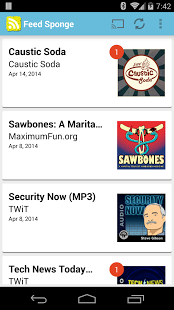
Feed Sponge is a general purpose Audio/Video RSS podcatcher. This app will soak up any podcast media format supported by Android.
Feed Sponge will download your feeds automatically in the wee hours via WiFi so you can take them along during the day. You may also download or stream any time you please with whatever connection is available. Keep in mind that you may encounter restrictions or charges based on carrier policy and your data plan.
* Simple interface.
* Stream audio or video episodes to Chromecast.
* Stream non-downloaded episodes to the device.
* Automatic download schedule with adjustable recurring update intervals.
* You have the option to skip auto downloads when:
** Battery is lower than a specified level.
** Device not connected to AC power.
** WiFi network is unavailable.
** Per-subscription option to disable.
* Automatically deletes old episodes based on your settings.
* Tracks playback position and resumes playback.
* Integrated feed guide for popular content.
* Add any valid RSS feed URL manually or by clicking a pcast:// link in your browser.
* Auto pause/resume on phone calls (inbound or outbound).
* Auto pause/resume on headset removal/insertion.
* Auto pause/resume on Bluetooth disconnect/reconnect e.g. your car.
* Configurable auto resume time limit.
Please report detailed bugs to the email below or @ideanebula on Twitter. The more detail, the better.
Your carrier may put steep charges on data overages, please keep your data plan in mind when downloading without WiFi. Most carriers provide tools to check your data usage, please use these tools.
About Feed Sponge
The company that develops Feed Sponge is Idea Nebula. The latest version released by its developer is 2.0.2.
To install Feed Sponge on your Android device, just click the green Continue To App button above to start the installation process. The app is listed on our website since 2014-08-09 and was downloaded 0 times. We have already checked if the download link is safe, however for your own protection we recommend that you scan the downloaded app with your antivirus. Your antivirus may detect the Feed Sponge as malware as malware if the download link to com.caller9.feedsponge is broken.
How to install Feed Sponge on your Android device:
- Click on the Continue To App button on our website. This will redirect you to Google Play.
- Once the Feed Sponge is shown in the Google Play listing of your Android device, you can start its download and installation. Tap on the Install button located below the search bar and to the right of the app icon.
- A pop-up window with the permissions required by Feed Sponge will be shown. Click on Accept to continue the process.
- Feed Sponge will be downloaded onto your device, displaying a progress. Once the download completes, the installation will start and you'll get a notification after the installation is finished.
Program Details
System requirements
Download information
Pricing
Version History
version 2.0.2
posted on 2014-08-09
Version 2.0.2 another bug fix for Android 4.0-4.1 devices.,Version 2.0.1 bug fix for Android 4.0-4.1 devices.,Version 2.0 was rewritten from the ground up.,New UI,Chromecast Support,Streaming Support,Bluetooth Integration,Lockscreen Controls,Android Beam via NFC to Share Subscriptions,Adjustable Recurring Updates,More Playback Options
version 1.4.8
posted on 2012-01-05
Several fixes and updates
Disclaimer
Official Google Play Link
We do not host Feed Sponge on our servers. We did not scan it for viruses, adware, spyware or other type of malware. This app is hosted by Google and passed their terms and conditions to be listed there. We recommend caution when installing it.
The Google Play link for Feed Sponge is provided to you by apps112.com without any warranties, representations or guarantees of any kind, so access it at your own risk.
If you have questions regarding this particular app contact the publisher directly. For questions about the functionalities of apps112.com contact us.
